
The store schedule
Read The store first for how schedules, offers and the economy fit together.
Open a schedule
Section titled “Open a schedule”Store schedules are files like any other. The daily shop’s is catch_fallback_2021: search the Project window for
fallback commerce_schedule and double-click it. A schedule opens as a tab showing every day and its offers:
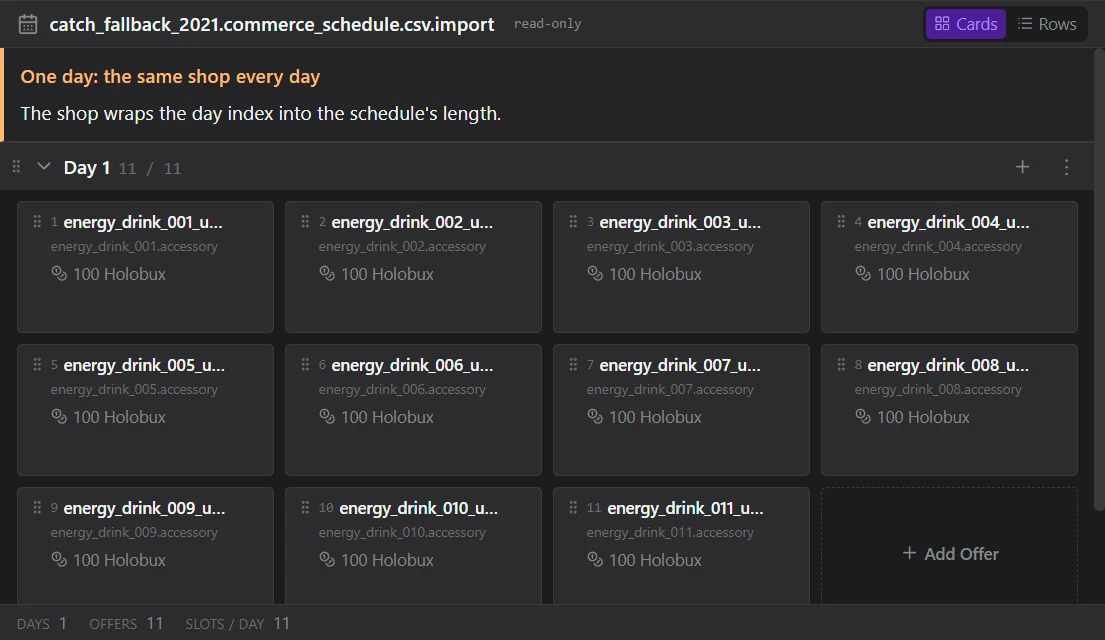
- Studio's guardrails: here, that one day means the same shop every day.
- One day, and how many offers it holds.
- Add an offer to the day.
The shipped daily shop has one day of eleven energy drinks, which is why a fresh private server sells the same thing every day.
Two views
Section titled “Two views”- Cards: each day as a grid of offer cards, closest to what players see.
- Rows: each day as a compact list, for long schedules.
Switch with the buttons at the top right of the tab.
Editing
Section titled “Editing”- Add an offer with the Add Offer tile at the end of a day, then pick the offer.
- Reorder by dragging a card; drag it onto another day to move it there.
- Duplicate a day, move it up or down, or remove it from the day’s menu (the ⋮ at its right). The last day can’t be removed: a schedule needs at least one.
- Each card shows what the offer sells, its price and any purchase limit, and whether the economy lists it.
Changes apply at once and each is one undoable step. Editing the shipped schedule makes it your override, like any shipped file.
Guardrails
Section titled “Guardrails”Studio warns rather than refuses when a schedule looks wrong:
| Warning | Why it matters |
|---|---|
| One day only | The shop is the same every day. |
| More than 11 offers in a day | The daily shop’s tiles overlap past eleven. |
See another day
Section titled “See another day”The shop shows the backend’s day. Set Start at UTC in Settings › Run to see a later day without waiting, and move it on a whole day between tests.
Where to go next
Section titled “Where to go next”Tutorial: Put a bundle in the store.